
There are two ways to register DTA values in an International BID on the Cargo Sapiens platform:
-
Through the system interface
-
Through spreadsheet, with possible later completion in the interface (if additional charges such as ad valorem, apportionment, tolls, etc. are required)
Registration via Interface
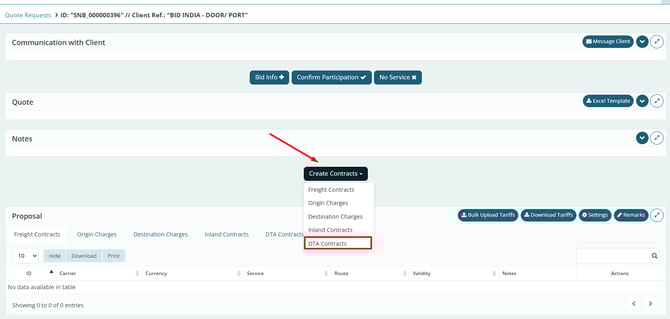
On the BID homepage, click “Create Contracts” and then “DTA Contracts”.
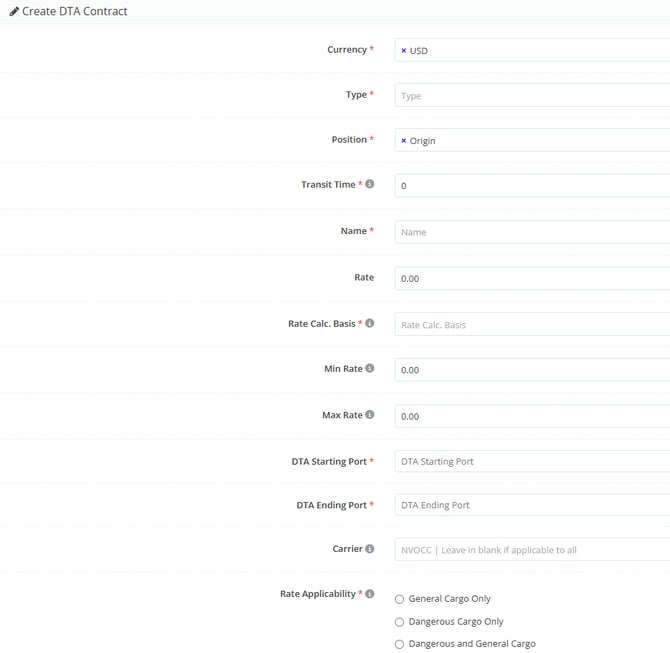
Next, fill in the required fields as indicated below:
-
Currency: billing currency for the DTA.
-
Type: indicate whether the DTA will be consolidated (LTL) or dedicated (FCL).
-
Position: select whether the transit occurs at origin or destination.
-
Transit Time: number of days between the involved ports/airports.
-
Name: free-text field that should contain only the DTA route segment.
-
Example: “DTA - GRU x VIX” or “DTA Port of Santos x EADI Betim”.
-
-
Rate: amount charged for the DTA.
-
Rate Calc. Basis: how the charge will be calculated (per shipment, per kg – gross weight –, etc.).
-
DTA Starting Port: origin port/airport of the DTA.
-
DTA Ending Port: destination port/airport of the DTA.
-
Rate Applicability: select whether it applies to general cargo, dangerous cargo, or both.
Important
For the calculation to work correctly, the DTA Origin Airport/Port must be the same as the Freight Destination Airport/Port informed in the freight tab. In this way, the DTA will function as the “leg” between the freight destination airport/port and the final destination.
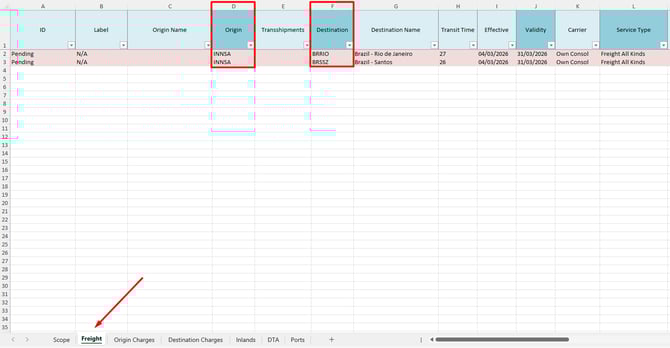
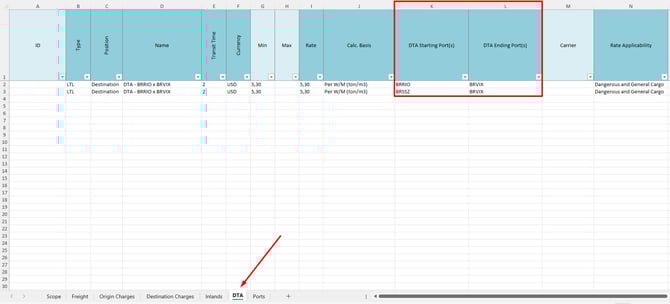
Example: if your DTA is at destination and the destination ports informed in the Freight tab were BRRIO (Rio de Janeiro) and BRSSZ (Santos), in the interface you must inform these two ports in the “DTA Starting” field. In “DTA Ending”, you should inform the final DTA ports, such as BRVIX, for example.
Registration via Spreadsheet
The same information available in the interface can be filled in the Supplier BID Template spreadsheet, using the corresponding columns and selecting options from the dropdown lists when applicable.

Note: If the DTA tariff varies according to weight ranges, the values must be entered separately for each range (applicable only for air modal spreadsheets). This way, the system will automatically apply the correct pricing according to the cargo weight.
The rule requiring correspondence with the information in the freight tab also applies to entries made through the spreadsheet, as shown below.
Example of filling in the freight tab:
Example of filling in the DTA tab:
To better understand how to include DTA surcharges and other advanced configurations, we suggest accessing the tutorial “Advanced configurations: how to customize your Inland and DTA costs.”