
A Business Unit (BU) represents a division within the company.
Use this registration to segment departments, branches, operational units, or internal structures that need to be managed separately within the system.
With a Business Unit, you can organize operations independently, create SPOT quotations and BIDs linked to a specific unit, generate customized financial reports, and control which information each user can access.
In addition, the Business Unit can be used to configure a default currency, email notifications, thank-you letters, PDF logos, and the users who should be copied on quotations.
When to Create a Business Unit
Create a Business Unit when you need to separate operations or information based on the company's internal structure.
- Different branches or offices.
- Different business areas.
- Operational units.
- Manufacturing plants.
- Commercial divisions.
- Units that operate with different currencies.
- Teams that require separate reporting.
- Operations that require specific access controls.
- BIDs or SPOT quotations that must be linked to a specific area or department.
How to Create a Business Unit
1. Access the Business Units Page
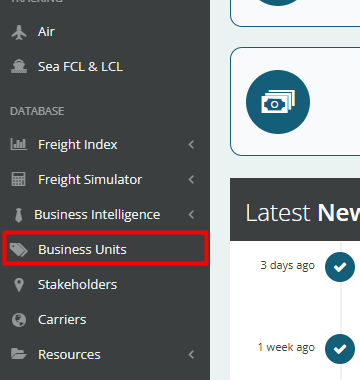
In the left-hand menu, locate the Database section.
Then, click Business Units.
2. Click Add Business Units
In the upper-right corner of the page, click the Add Business Units button.
The system will open the form to create a new Business Unit (BU).

3. Complete the Required Fields
In the creation form, fill in all required fields marked with a red asterisk.
These fields are necessary to create the Business Unit in the system.

- Name: Fill in the BU name.
- Currency: Enter, if desired, the currency that will be the default for this BU at the time of quotation equalization.
- Type: Define whether or not this BU will be customized. If it is, you will have the option to add a specific logo for this business unit (this logo will appear in the PDFs extracted from the system) and customize the nomination and thank-you letter emails, as well as the email settings.
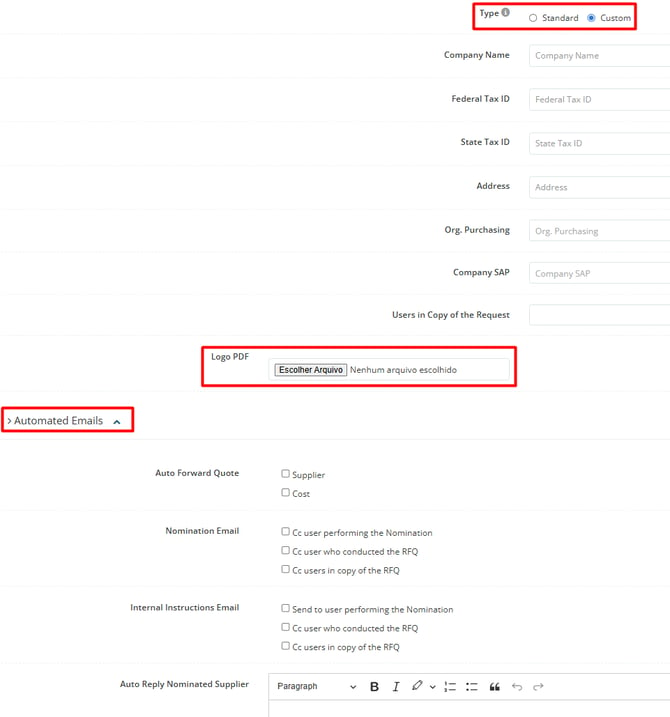
- Additional Business Unit Information: You can fill in, if you wish, the company/BU name, Federal Tax ID, State Registration and Address.
- Users in Copy of the Request: It is also possible to automatically set all users who should be in copy of the open quotations linked to this BU.
4. Click Submit
After completing and reviewing the information, click Submit to finalize the Business Unit registration.
Once submitted, the Business Unit will be available in the system and can be used in quotations, BIDs, reports, and other workflows that use business unit segmentation.