
Use price feedback without nomination when the company decides not to proceed with any logistics provider but still wants to send feedback to the suppliers who participated in the quote.
This feature is useful when the quote will not move forward for internal reasons, but the team still wants to maintain structured communication with the participants. No settings need to be enabled to send this feedback.
What the Supplier Receives
The supplier will receive an email informing them that the quote was not awarded.
The message also indicates how their rates were positioned compared to the best offer received. Example message:
Hello!
This quote was not awarded, but if we had moved forward, your rates would have been 60% to 70% higher compared to the best offer.
Thank you for your time, attention, and interest in participating in our RFQ/RFP. We will keep in touch for future opportunities.
The percentage displayed may vary according to the proposal submitted by each supplier.
How to Send Price Feedback Without Nomination
1. Go to the Quotes screen
In the left-side menu, click Quotatioms. Click the eye button on the right side of the quote for which you want to send the feedback.

2. Go to Analyze Quote
Inside the quote, click Analyze Quote.
This screen shows the proposals received from suppliers and allows you to access the price feedback feature.

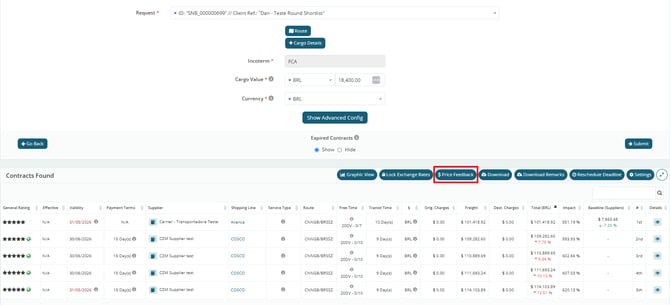
3. Click Price Feedback
On the analysis screen, click the Price Feedback button.
This button starts the process of sending feedback to the quote suppliers.
4. Read the Informational Message
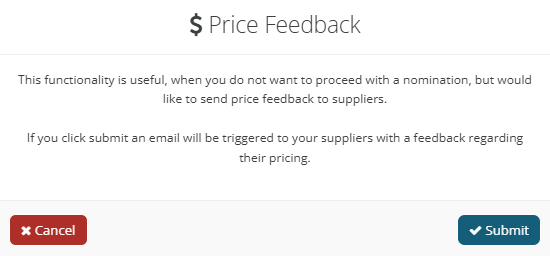
The system will display a message explaining the feature.
The message informs you that this feature should be used when the company does not want to proceed with a nomination but still wants to send price feedback to suppliers.
Confirm the submission. The system will send the price feedback email to the suppliers.
After Submission
After the feedback is sent, suppliers will receive a communication indicating that the quote was not awarded.
The message will also show the percentage range of the supplier’s proposal compared to the best offer received.