
If a client quote that you, as a logistics provider, are responsible for is not visible, it is essential to follow the steps below to identify the reason.
1. Check if you are in the correct environment
Each client has a unique environment. This means that for each quote from a client, the access link (URL) will be different. Therefore, the first step for you, as a logistics provider, to understand why a quote is not visible is to verify that you are in the correct client environment.
2. Check if any filters are applied
Filters help simplify the display of quotes according to their status. If a quote (BID or SPOT) is not visible to you, make sure no filters are active.
Click the Filters button at the top right of the quotes table to check if any filter is active.

Confirm whether a filter is active. In the example below, note that a "Status" filter is enabled; therefore, only open quotes will be visible to the logistics provider.
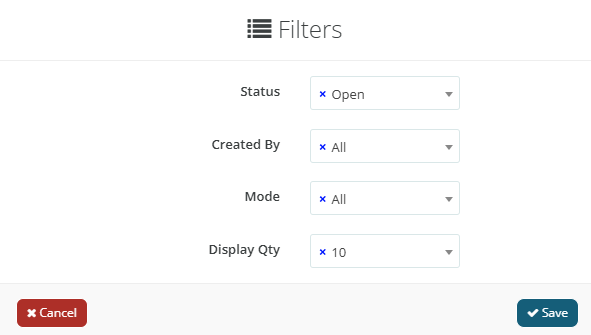
Other filters that might be applied include:
-
Created by: filter by the client user who created the quote.
-
Mode: filter by transport mode.
-
Displayed Quantity: adjust the number of quotes shown in the table.
If the logistics provider frequently needs to remove filters, this tutorial allows you to customize your environment according to your needs. Below, you can also review the possible quote statuses:
-
Open: quotes that have not yet reached the deadline, so logistics providers can still submit offers.
-
Closed: quotes that have reached the deadline but have not yet been awarded.
-
Awarded: in the logistics provider’s view (which differs from the client’s view), this status means the provider won that route.
-
Cancelled: quotes that were cancelled.
-
Counterproposal: quotes where a counteroffer was made to the logistics provider.
-
On Hold: quotes that have been marked as on hold by the client.
-
Declined: when the logistics provider sees this status, it means they did not win that route.
If, even after following these steps, the logistics provider still cannot find the quotes, they must contact support.