
In Cargo Sapiens, it is possible to simultaneously create an LCL quote and an air quote, or vice versa, from a single request.
This feature was developed to simplify operations and support decision-making. With it, you can quickly compare transport modes considering factors such as cargo dimensions, weight, and urgency, choosing the option with the best cost-benefit for each shipment.
How it works in practice
The process is automatic: when opening a quote, the system generates the second quote based on the same operational information.
The only difference between them will be the calculation criteria (chargeable weight or cubic ton), depending on the mode.
For you, the customer, the experience is transparent — it’s as if the quote were simply replicated.
For the invited logistics providers, the requests appear as two separate quotes, each in its respective mode.
The result is greater agility, less rework, and better-informed decisions from the start of the negotiation. See below how to do it.
First, go to the settings menu:
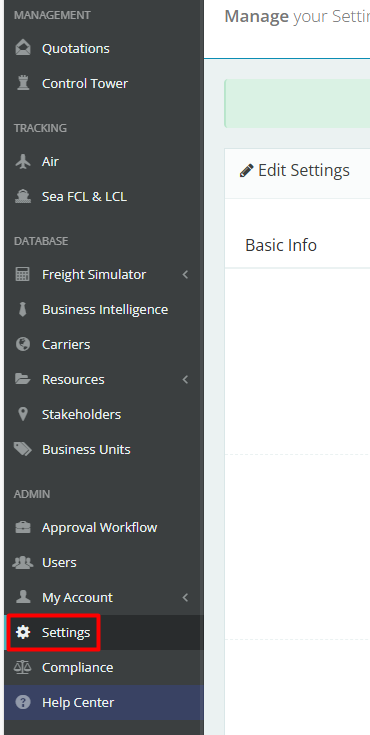
After that, search for “Air/LCL” and enable the setting:

This way, when creating an LCL quote, the following option will appear on the quote creation screen:

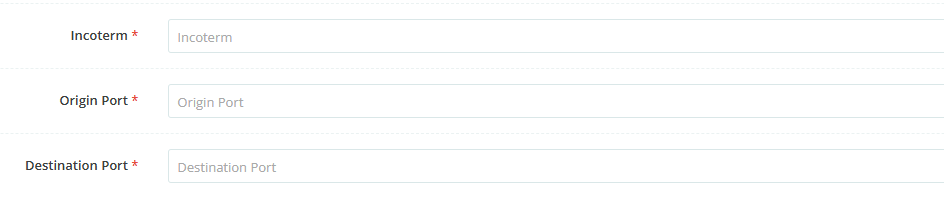
By selecting this option, the following fields will appear:
-
Incoterm: According to the selected mode, choose the route’s incoterm.
-
Port of Origin: Depending on the incoterm and mode, select the port of origin.
-
Port of Destination: Depending on the incoterm and mode, select the port of destination.
Thus, when proceeding with the creation of the air quote, an FCL quote will also be created, with the same information but a different mode.
The analysis of each quote will be carried out individually. To do so, the customer must click on the “Analyze quote” button in each one and then compare the values obtained in both to understand which mode offers the best cost-benefit for their cargo.